Lists for any goal — for families and teams
A trip, dinner for six or the office shop. Put the list together yourself or ask Rinka, the AI assistant, tick items off together and see what the goal cost. Sharing a list takes a free account. Viewing a shared list needs no account; ticking items off comes after a free sign-in.
- Google Play — coming soon
- App Store — coming soon
An app for Android and iOS. It is not in the stores yet.
What Cartdock does
Eight things the app does today. Where AI does the work, the card says so.
- AI
Rinka, the AI assistant
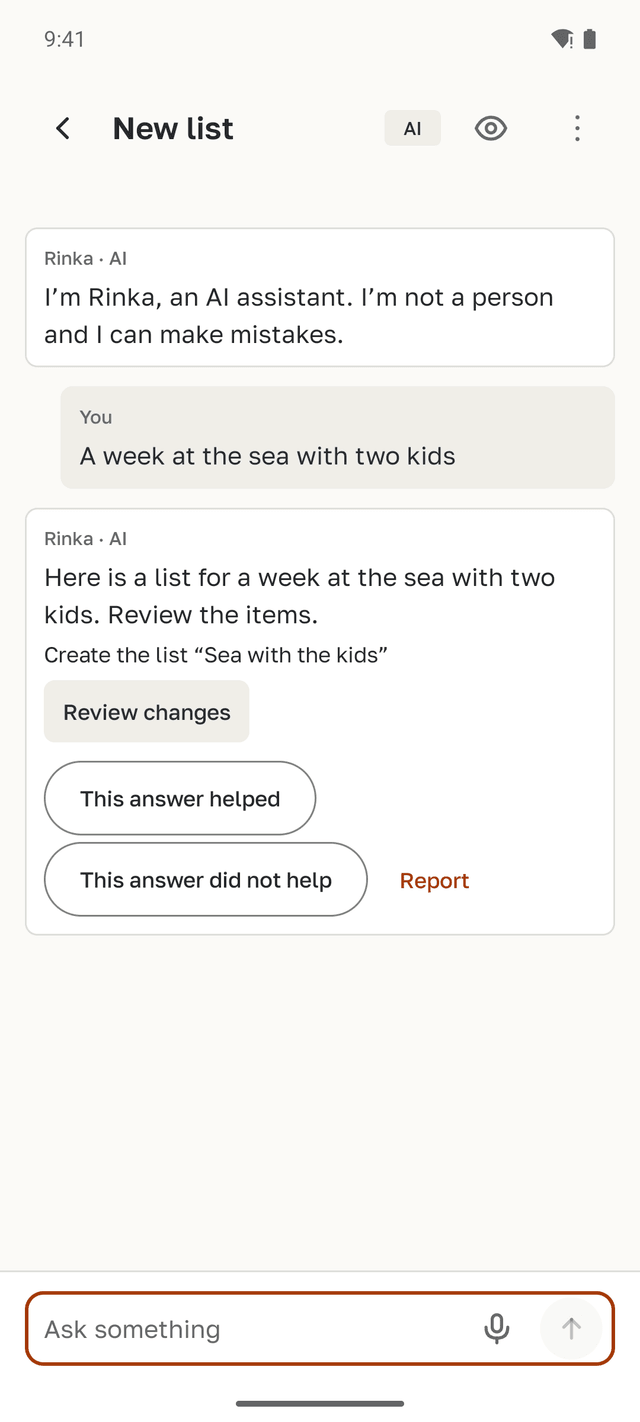
Say or type one phrase, and Rinka suggests items by section. Rinka is an AI, not a person: a language model writes the answers. Rinka needs a connection and your consent to AI processing. Without an account you get fewer questions; the number of questions depends on your plan.
Buy, take along, to do
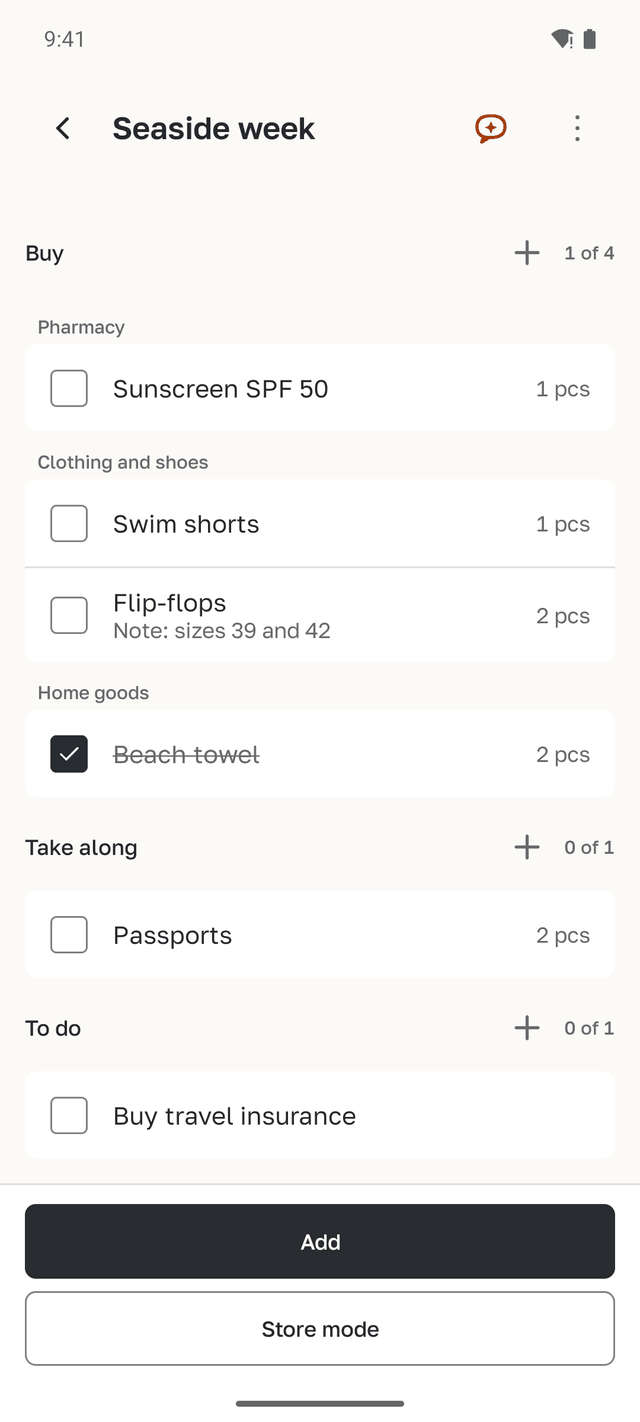
One list holds what to buy, what to take along and what to do. Everything gets the same “done” checkmark.
Lists that work offline
Lists, items and checkmarks are stored on your phone and work without a connection.
Store mode
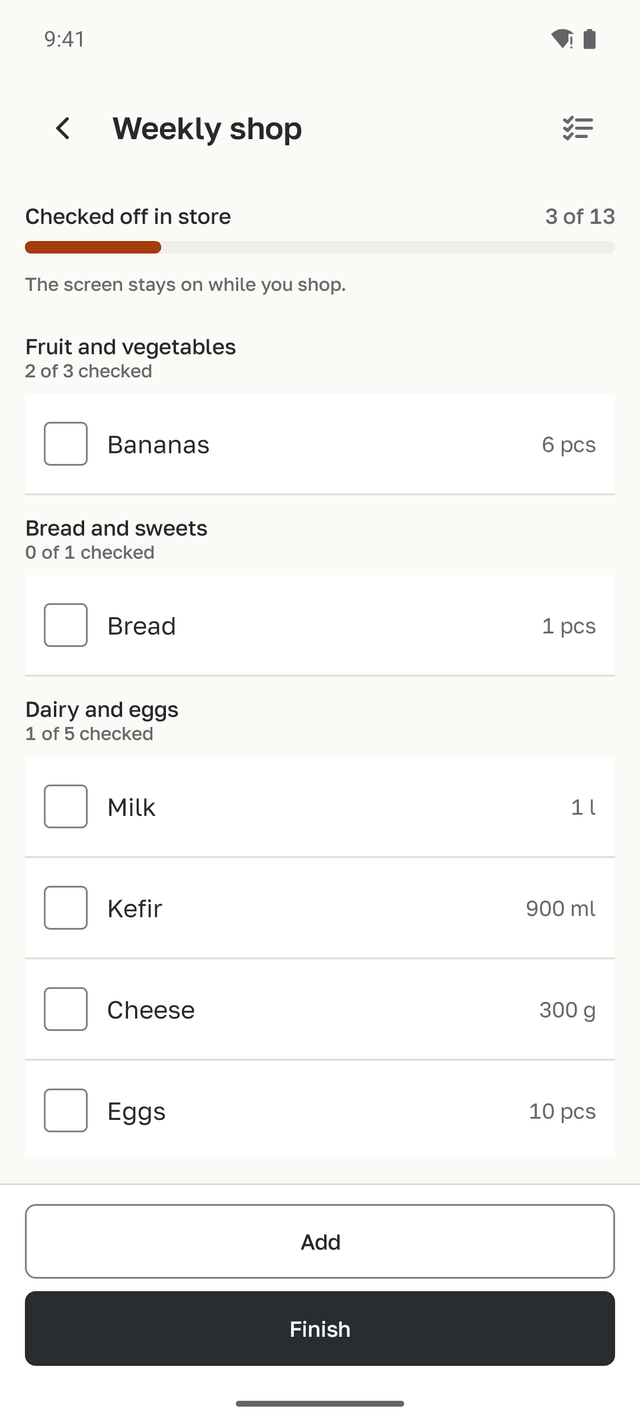
Only what to buy, grouped by store aisle. The screen stays on while you shop.
Send a copy
Send a copy as text, as a CSV spreadsheet or as a ready request for ChatGPT. You paste the request into ChatGPT yourself.
Shared list
Members tick items off from their own phones, and everyone sees the changes. The list owner creates the link with an account; on the Free plan, for a few lists at a time. Viewing a shared list needs no account; ticking items off comes after a free sign-in.
- AI
Receipt scan
AI reads the lines of a receipt, and you review them before saving. It needs a connection and your consent to AI processing. The number of scans depends on your plan.
Spending by goal
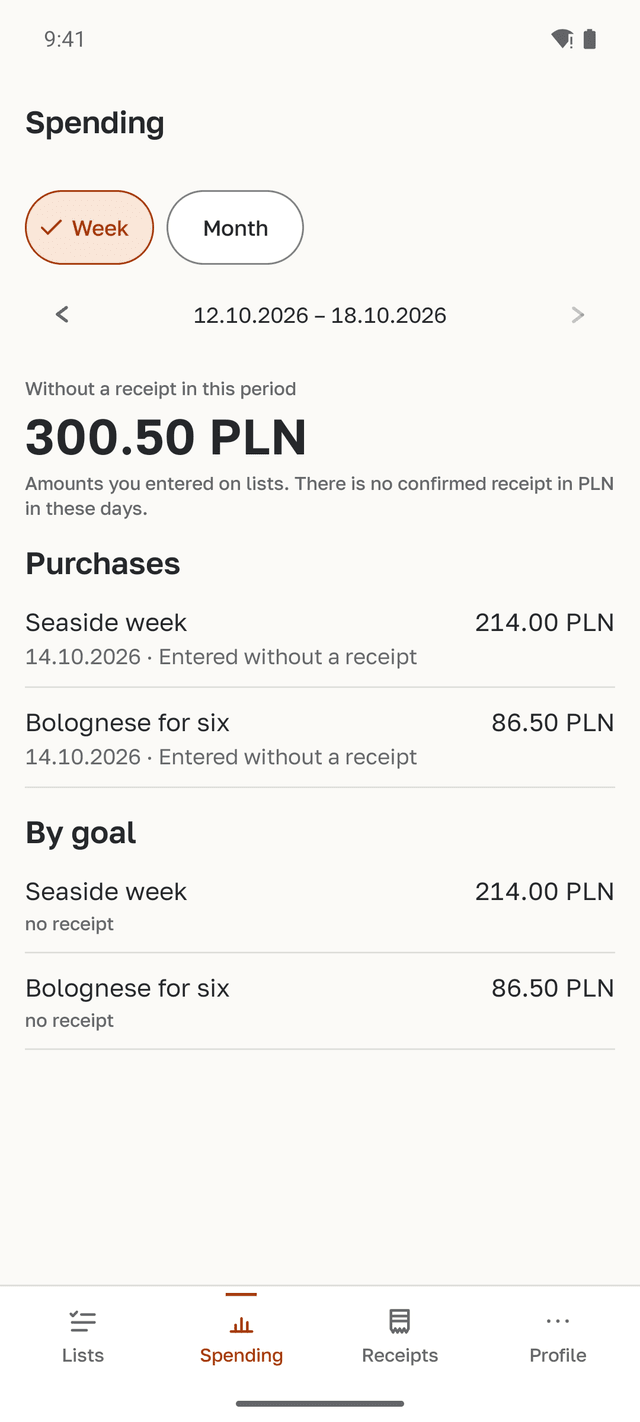
See spending by category and by goal. No receipt? Once everything is bought, enter the amount on the list, and it is marked “no receipt”.
How it works
Four steps from a goal to what it cost, on real app screens with sample data.
A goal becomes a list
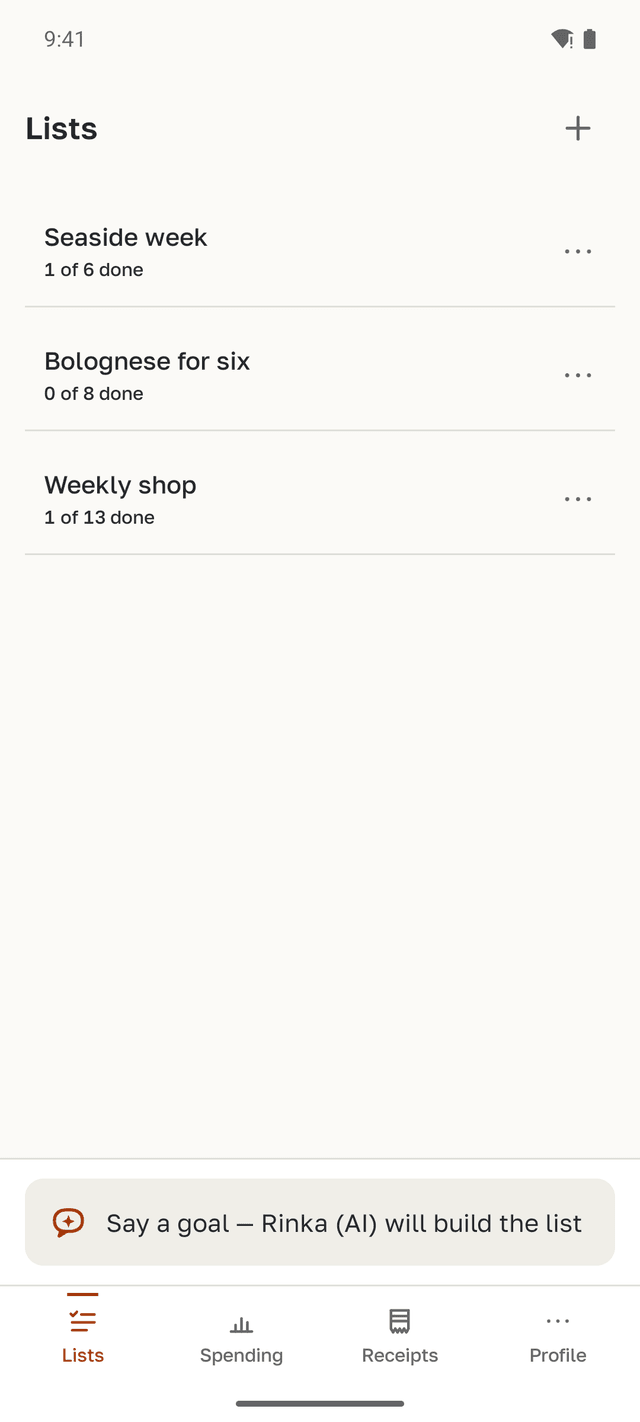
Type or say a goal, and Rinka, the AI assistant, suggests items grouped by section. You review them before they are added. You can also build a list by hand — that works offline.
The list is shared
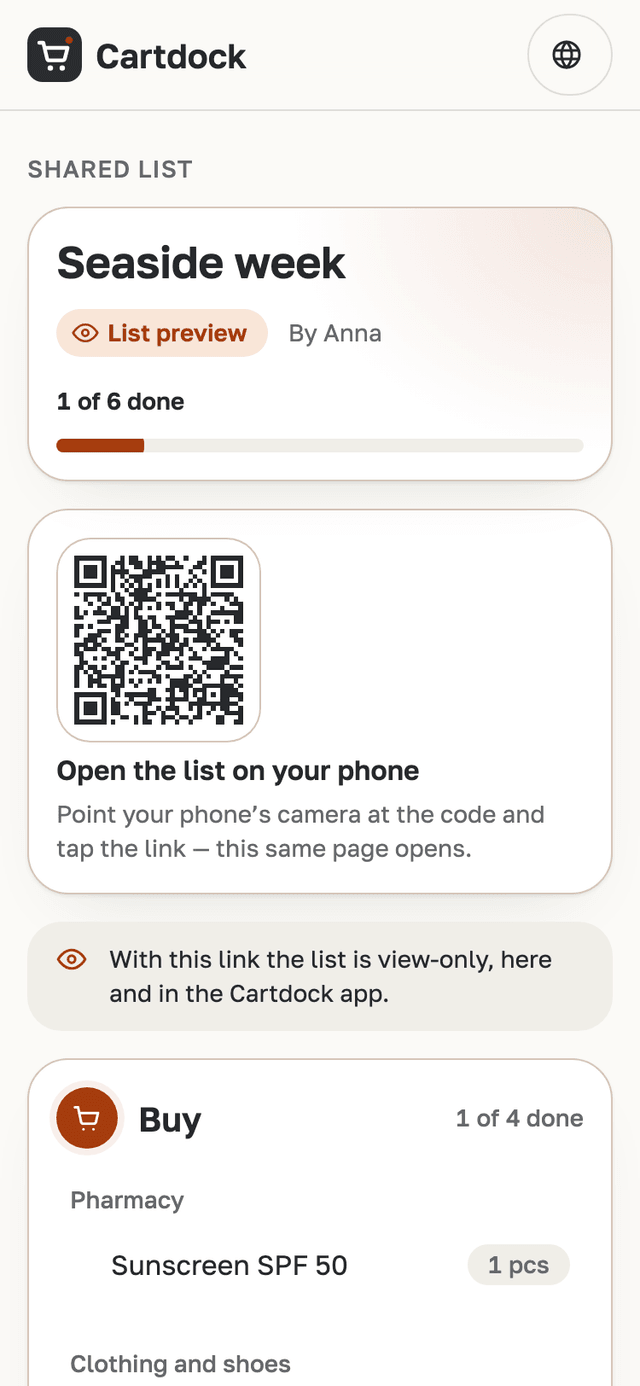
Share a link: members tick items off from their own phones, and someone without the app sees the list in a browser.
- Someone without the app opens the link in a browser. They see the list by section and can save it as TXT or CSV. Ticking items off works only in the app.
- Members with the app tick items off from their own phones, and everyone sees the changes.
- The list owner creates the link with an account; on the Free plan, for a few lists at a time. Viewing a shared list needs no account; ticking items off comes after a free sign-in.
In the store
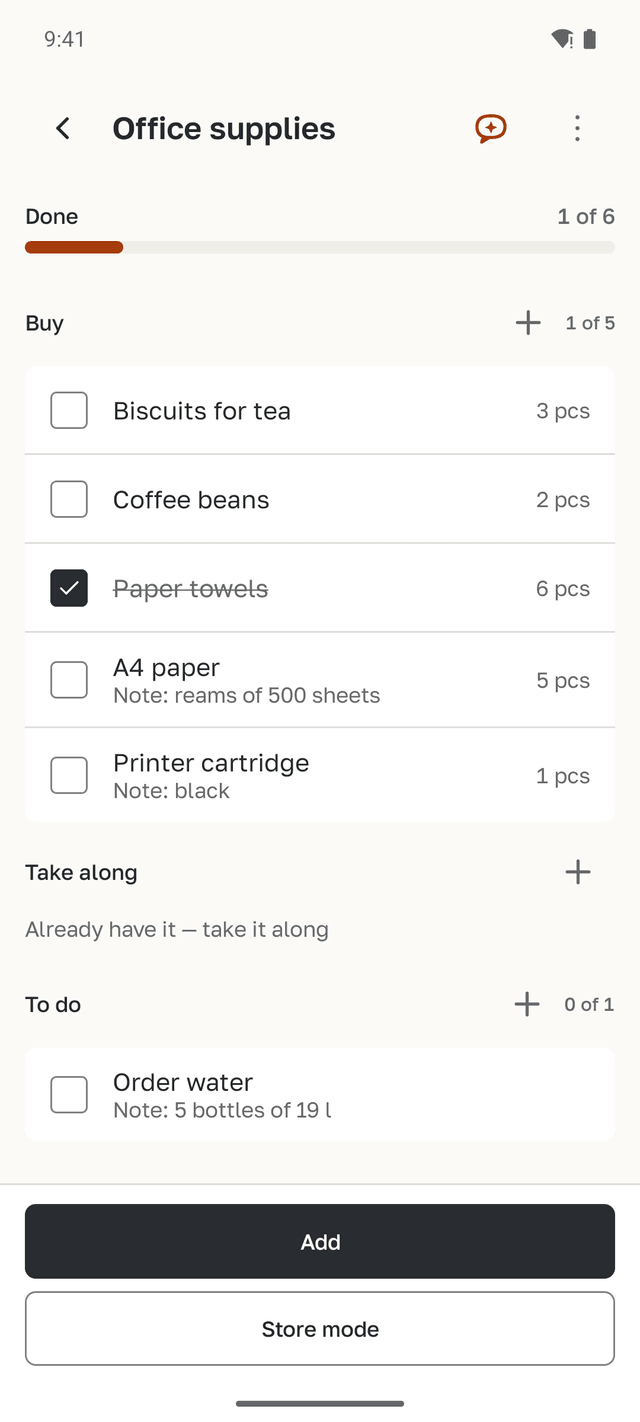
Store mode shows only what to buy, aisle by aisle. Tick items off as you go — the screen stays on.
After the shop
Once everything is bought, enter the amount or photograph the receipt, and the spending lands on the goal. Spending shows by category and by goal.
Who it is for
Four everyday situations and the features each one uses.
A family before a holiday
“A week at the sea with the kids”: sunscreen and flip-flops under Buy, passports under Take along, travel insurance under To do. Everyone ticks off their part on their own phone.
Dinner from a recipe
Bolognese for six: ingredients by aisle, each with an amount and a note. After the shop you see what the dinner cost.
The office shop
One shared list for the team instead of spreadsheets and photos of shelves in a chat. What the shop cost shows up as its own goal in your spending.
Someone with the link
A grandmother or a colleague opens the link in a browser, sees the list by section and can save it as a file. No app to install.
Offline, and only with your consent
- Lists, items and checkmarks work without a connection. Until you share a list, it stays only on your phone.
- Rinka and receipt scans work only online and only after you consent to AI processing. Rinka does not see what is on your lists or receipts.
- Export and delete your data in the app, under “My data”.
- This page has no forms and no analytics. The site sets one cookie — the language, if you choose it yourself.
Plans
Lists, store mode and spending work on every plan. The plans differ in three things.
Free
no charge
- Receipt scans
- a few
- Questions to Rinka
- a few
- Shared lists for family and team
- a few
Lite
- Receipt scans
- more
- Questions to Rinka
- more
- Shared lists for family and team
- included
Plus
- Receipt scans
- the most
- Questions to Rinka
- the most
- Shared lists for family and team
- included
A plan belongs to an account. The app shows the exact limits. Lite and Plus are monthly subscriptions bought in the app through Google Play or the App Store; the store shows the price for your country.
Questions and answers
How much does it cost?
The Free plan costs nothing. Lite and Plus are monthly subscriptions with no free trial: the app and the store show the price for your country before you buy. How to cancel and get money back is described in the terms of use.
Do I need an account?
Not for lists, store mode or spending. Without an account Rinka and receipt scans work too, but with fewer questions and scans. Without an account you cannot share lists, and someone else’s shared list is view-only. If the app does not contact our server for two weeks, we delete the data without an account from it; the data on your phone stays. You can sign in with Google or with an email and a password.
What works offline?
Lists, items, sections, checkmarks and store mode. Rinka, receipt scans and list links need a connection.
What does the AI receive?
Rinka receives the text of your question and the IDs of the lists you attach, never their contents. Rinka does not see your receipts. For a scan, the AI receives the photo of the receipt. Nothing is sent without your consent to AI processing. Your phone’s speech recognition service turns your voice into text.
How do I share a list with someone who does not have the app?
The list owner creates the link with an account; on the Free plan, for a few lists at a time. The recipient opens it in a browser for free, sees the list and can save it as TXT or CSV. You can also send a copy of the list as text.
What languages is the app in?
The app is in eight languages, the same as this website: English, Spanish, Polish, German, French, Russian, Ukrainian and Belarusian. If your phone is set to another language, the app is in English.
How do I delete my data?
In the app, under “My data”. You can also download an archive of your data there. Deletion starts after 24 hours, and you can cancel it until then.
When will the app be in the stores?
The app is being prepared for release on Google Play and the App Store. There is no date yet.
Coming soon to the stores
Cartdock is coming to Android and iOS.
- Google Play — coming soon
- App Store — coming soon